
Notice
Recent Posts
Recent Comments
Link
| 일 | 월 | 화 | 수 | 목 | 금 | 토 |
|---|---|---|---|---|---|---|
| 1 | 2 | 3 | 4 | 5 | 6 | |
| 7 | 8 | 9 | 10 | 11 | 12 | 13 |
| 14 | 15 | 16 | 17 | 18 | 19 | 20 |
| 21 | 22 | 23 | 24 | 25 | 26 | 27 |
| 28 | 29 | 30 |
Tags
- JavaScript
- jQuery
- MySQL
- NPM
- 암호학
- C#크롤링
- Spring
- c:forEach
- 대칭키암호시스템
- vscode
- node.js
- 국제화
- 해시함수
- SQL
- Java
- 무결성
- 서드파티모듈
- 대칭키암호화
- 동적쿼리
- 대칭키알고리즘
- 전자서명
- fullcalendar
- jsx
- mybatis
- 공개키암호시스템
- JSTL
- AndroidStudio
- c:choose
- RequestMethod.POST
- react
Archives
- Today
- Total
Today Yewon Learned
[SQL] iBatis, MyBatis 이용하여 데이터 조회 실습(Dynamic Query) 본문
프로젝트를 진행중, 전체 장비의 스케줄 검색 결과와 선택한 장비의 스케줄 검색 결과를 구분해야 할 경우가 생겼다.
[전체 장비 검색 결과 index.jsp]

[schedule_pop.jsp]
insert, update, delete 시 findSchedule()를 콜백 메소드로 받음
function btn_save() {
	var form = $('form[name=saveForm]');
	var param = getSearchFormData(form);

	if($('input[name=ActionType]').val() == "I"){
		PostData('./insert_schedule_action.do', param, findSchedule);
	} else{
		PostData('./update_schedule_action.do', param, findSchedule);
	}
	//팝업 닫기
	close_layer();
}

function btn_remove() {
	var arr = new Array();

	$('#ScheTable > tbody > tr').each(function(){
		arr.push(GetData(this));
	});

	if (confirm("스케줄을 삭제 하시겠습니까?") == true){
		var jsonString = JSON.stringify(arr);
		JsonDataAjax('./delete_schedule_action.do', jsonString, findSchedule);
	} else {
		return;
	}
	//팝업 닫기
	close_layer();
}
[index.jsp]
■ $(obj).attr("id") != null)
- findSchedule(this) onclick이벤트로 받는 obj 파라미터
■ if(obj != undefined && obj != "true") 절
- 'insert/update/delete_schedule_action.do'의 결과로 콜백 받은 obj로 넘어오는 파라미터가
"true" 로 넘어옴 (controller return값)
function findSchedule(obj){

	var param = "START_DT=" + calendar.view.activeStart.toISOString().split("T")[0]
	   		  + "&END_DT=" + calendar.view.activeEnd.toISOString().split("T")[0];

	//MAC_CD 추가 - obj 있을 경우
	if($(obj).attr("id") != null){
		param += "&MAC_CD=" + $(obj).attr("id");
	} else if($("input[name=SELECT_M]").val() != "") {
		param += "&MAC_CD=" + $("input[name=SELECT_M]").val();
	}

	$('#calendar').css("display", "block");
	$('#calendar1').css("display", "none");

	PostData('./bindSchedule.do', param, bindSchedule);

	if(obj != undefined && obj != "true") {
		$('input[name=SELECT_M]').val($(obj).attr("id"));
	}
}
[ScheduleController.java]
@ResponseBody
@RequestMapping(value = "bindSchedule.do", method = RequestMethod.POST, produces = "application/text; charset=UTF-8")
public String bindSchedule (ModelMap model
                      , HttpServletRequest request
                      , ScheduleData data
                      , HttpSession session) throws Exception {

    data.setUSER_ID(session.getAttribute("id").toString());

    List<ScheduleData> list = scheduleService.selectScheduleList(data);

    JSONObject obj = new JSONObject();
    JSONArray arr = new JSONArray();
    JSONObject data_obj = new JSONObject();

    Calendar cal = Calendar.getInstance();

    int calStart = getDateByInteger(data.getSTART_DT()); //캘린터 표시 시작일
    int calEnd = getDateByInteger(data.getEND_DT()); //캘린더 표시 종료일

    if(list.size() > 0) {
        for (ScheduleData sche : list) {
            //if(sche.getSCHE_USE_YN() == null || sche.getSCHE_USE_YN().equals("N")) continue;
            int endDT = getDateByInteger(sche.getEND_DT());

            //스케줄 종료 날짜가 캘린더 표시 종료일보다 뒤인 경우 종료 날짜를 캘린더 표시 날짜로 변경
            if(endDT > calEnd) endDT = calEnd;

            if(chkAllday(sche)) {
                data_obj = new JSONObject();

                data_obj.put("groupId", sche.getSCHE_CD());
                data_obj.put("MAC_TYPE", sche.getMAC_TYPE());
                data_obj.put("title", sche.getCONT_NM());

                //스케줄 시작 날짜가 캘린더 표시 시작일보다 앞인 경우 시작 날짜를 캘린더 표시 날짜로 변경
                if(getDateByInteger(sche.getSTART_DT()) > getDateByInteger(data.getSTART_DT())) {
                    data_obj.put("start", sche.getSTART_DT());
                } else {
                    data_obj.put("start", data.getSTART_DT());
                }

                //스케줄 종료 날짜가 캘린더 표시 종료일보다 뒤인 경우 종료 날짜를 캘린더 표시 날짜로 변경
                if(getDateByInteger(sche.getEND_DT()) < getDateByInteger(data.getEND_DT())) {
                    cal.set(Integer.parseInt(sche.getEND_DT().split("-")[0]), Integer.parseInt(sche.getEND_DT().split("-")[1]) - 1, Integer.parseInt(sche.getEND_DT().split("-")[2]));
                } else {
                    cal.set(Integer.parseInt(data.getEND_DT().split("-")[0]), Integer.parseInt(data.getEND_DT().split("-")[1]) - 1, Integer.parseInt(data.getEND_DT().split("-")[2]));
                }

                cal.add(Calendar.DATE, 1);
                data_obj.put("end", getDateByString(cal.getTime()));

                data_obj.put("forceEventDuration","true");
                //data_obj.put("allDay", "true");
                data_obj.put("borderColor", "white");

                if(sche.getEMER_YN() !=null && sche.getEMER_YN().equals("Y")) data_obj.put("backgroundColor", "red"); //긴급 스케줄인 경우 빨간색으로 표시
                if(sche.getSCHE_USE_YN() == null || sche.getSCHE_USE_YN().equals("N")) data_obj.put("backgroundColor", "darkgray"); //미사용 스케줄인 경우 회색으로 표시

                arr.add(data_obj);
                continue;
            }

            cal.set(Integer.parseInt(sche.getSTART_DT().split("-")[0]), Integer.parseInt(sche.getSTART_DT().split("-")[1]) - 1, Integer.parseInt(sche.getSTART_DT().split("-")[2]));

            //기간을 날짜별로 분해
            while (true) {

                //재생하는 요일인지 확인
                if(getDateByInteger(cal.getTime()) >= calStart && chkDayOfWeek(sche, cal.get(Calendar.DAY_OF_WEEK))) {

                    data_obj = new JSONObject();

                    data_obj.put("groupId", sche.getSCHE_CD());

                    data_obj.put("title", sche.getCONT_NM());
                    data_obj.put("start", getDateByString(cal.getTime()) + "T" + sche.getSTART_TIME());
                    data_obj.put("end", getDateByString(cal.getTime()) + "T" + sche.getEND_TIME());
                    data_obj.put("borderColor", "white");
                    if(sche.getEMER_YN() !=null && sche.getEMER_YN().equals("Y")) data_obj.put("backgroundColor", "red"); //긴급 스케줄인 경우 빨간색으로 표시
                    if(sche.getSCHE_USE_YN() == null || sche.getSCHE_USE_YN().equals("N")) data_obj.put("backgroundColor", "darkgray"); //미사용 스케줄인 경우 회색으로 표시

                    arr.add(data_obj);
                }

                //calendar 날짜 하루씩 증가
                cal.add(Calendar.DATE, 1);

                //날짜가 종료일자보다 크면 종료
                if(getDateByInteger(cal.getTime()) > endDT) break;
            }

        }
        obj.put("ScheList", arr);
    }

    return obj.toString();
}
[SQL.xml]
MyBatis 동적쿼리 이용하여 WHERE절에 MAC_CD가 있는 경우, 해당 장비의 스케줄만 검색
<select id="selectScheduleList" resultMap="scheInfo">
		SELECT T1.SCHE_CD
		     , T1.USER_ID
		     , T1.MAC_CD
		     , T2.MAC_ID
		     , T2.MAC_TYPE
		     , T2.MAC_TITLE
		     , T1.CONT_CD
		     , T3.CONT_NM
		     , T3.WIDTH_TYPE
		     , CONCAT(SUBSTR(T1.START_TIME, 1 ,2), ':', SUBSTR(T1.START_TIME, 3, 2) ) AS START_TIME
		     , CONCAT(SUBSTR(T1.END_TIME, 1 ,2), ':', SUBSTR(T1.END_TIME, 3, 2)  ) AS END_TIME
		     , T1.START_DT
		     , T1.END_DT
		     , T1.WEEK_MON
		     , T1.WEEK_TUE
		     , T1.WEEK_WED
		     , T1.WEEK_THU
		     , T1.WEEK_FRI
		     , T1.WEEK_SAT
		     , T1.WEEK_SUN
		     , T1.SCHE_SORT
		     , T1.SCHE_USE_YN
		     , T1.SCHE_VIEW_TIME
		     , T1.EMER_YN
		  FROM js_schedule AS T1
		       INNER JOIN js_machine AS T2 ON T2.MAC_CD = T1.MAC_CD
		       INNER JOIN js_contents AS T3 ON T3.CONT_CD = T1.CONT_CD
		 WHERE 1=1

		<if test="START_DT != null and END_DT != null">
			AND #{END_DT} >= T1.START_DT
		 	AND T1.END_DT >= #{START_DT}
		</if>

		<if test="USER_ID != admin">
			AND T1.USER_ID = #{USER_ID}
		</if>

		<if test="MAC_CD != null">
		 	AND T1.MAC_CD = #{MAC_CD}
		</if>

		<if test="MAC_ID != null">
		 	AND T2.MAC_ID = #{MAC_ID}
		</if>

		<if test="SCHE_CD != null">
			AND T1.SCHE_CD = #{SCHE_CD}
		</if>

		<if test="SCHE_USE_YN != null">
			AND T1.SCHE_USE_YN = #{SCHE_USE_YN}
		</if>

          ORDER BY T1.SCHE_SORT
        <!-- ORDER BY T1.INS_DATE DESC -->

	</select>
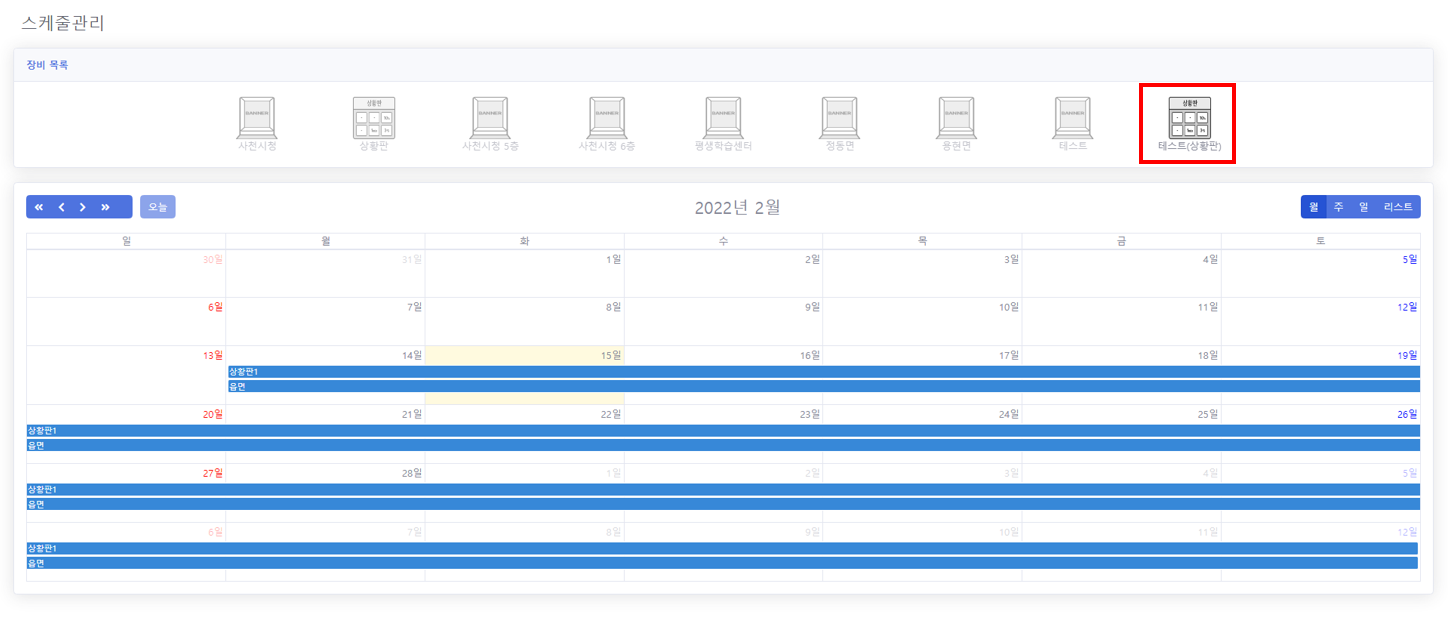
[최종 결과 화면 index.jsp]
장비별 스케줄 팝업 창에서 데이터 조회, 저장, 수정, 삭제 시 해당 장비의 스케줄만 갱신되어 조회 되도록 수정함

[참조] https://velog.io/@gillog/MyBatis-iBatis-MyBatis-%EB%B9%84%EA%B5%90-%EC%A0%95%EB%A6%ACDynamic-Query
'SQL' 카테고리의 다른 글
| [MySql] CASE WHEN ~ THEN ~ELSE END 문법 (0) | 2023.05.22 |
|---|---|
| [SQL] 기존 DB 새로운 DB로 복사하기 (0) | 2022.10.21 |
| [MySQL] 새로운 DB에 기존 DB옮기기 [RENAME DATABASE] (0) | 2022.08.18 |
| [SQL] MySQL 그룹 별 최신 데이터 가져오기 (0) | 2022.01.21 |
| [SQL] JOIN (1) | 2022.01.10 |
'SQL' Related Articles
more


Comments