
Notice
Recent Posts
Recent Comments
Link
| 일 | 월 | 화 | 수 | 목 | 금 | 토 |
|---|---|---|---|---|---|---|
| 1 | 2 | |||||
| 3 | 4 | 5 | 6 | 7 | 8 | 9 |
| 10 | 11 | 12 | 13 | 14 | 15 | 16 |
| 17 | 18 | 19 | 20 | 21 | 22 | 23 |
| 24 | 25 | 26 | 27 | 28 | 29 | 30 |
| 31 |
Tags
- JavaScript
- 서드파티모듈
- 대칭키암호시스템
- mybatis
- react
- SQL
- 대칭키암호화
- 전자서명
- MySQL
- vscode
- NPM
- 암호학
- 국제화
- jsx
- JSTL
- Java
- Spring
- node.js
- jQuery
- 대칭키알고리즘
- 공개키암호시스템
- 해시함수
- C#크롤링
- RequestMethod.POST
- AndroidStudio
- c:choose
- c:forEach
- fullcalendar
- 동적쿼리
- 무결성
Archives
- Today
- Total
Today Yewon Learned
[C#] HtmlAgilityPack을 이용한 웹 크롤링 본문
1. 도구(T) - NuGet패키지 관리자 - 솔루션용 NuGet패키지 관리탭에서 HtmlAgilityPack을 다운로드한다.

2. 아래와 같이 디자이너 폼을 구성한다.
· Form1.Designer.cs
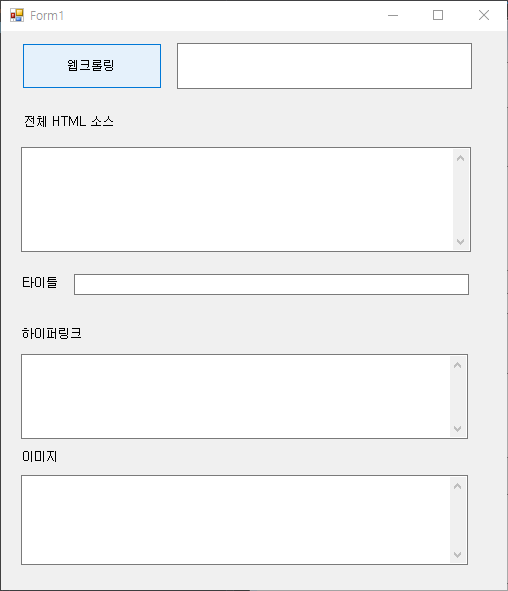
3. 아래 코드를 작성한다.
· Form1.cs
using HtmlAgilityPack;
using System;
using System.Collections.Generic;
using System.ComponentModel;
using System.Data;
using System.Drawing;
using System.Linq;
using System.Net;
using System.Text;
using System.Threading.Tasks;
using System.Windows.Forms;

namespace WEBCrawling
{
    public partial class Form1 : Form
    {
        public Form1()
        {
            InitializeComponent();
        }

        private void button1_Click(object sender, EventArgs e)
        {
            using(WebClient client = new WebClient())
            {
                client.Encoding = Encoding.UTF8;
                string htmlSource = client.DownloadString("http://" + txtURL.Text);
                txtResult.Text = htmlSource;
                Console.WriteLine(htmlSource);
                Console.ReadLine();
                HTMLParser parser = new HTMLParser();
                parser.ParseHTML(htmlSource, this.txtHyperLink, this.txtTitle, this.txtImg);

            }
        }
    }

    public class HTMLParser
    {
        public void ParseHTML(string htmlSource, TextBox hyperLink, TextBox title, TextBox img)
        {
            HtmlAgilityPack.HtmlDocument doc = new HtmlAgilityPack.HtmlDocument();
            doc.LoadHtml(htmlSource);

            title.Text = doc.DocumentNode.SelectSingleNode("//head/title").InnerText;

                foreach (HtmlNode bodyNode in doc.DocumentNode.SelectNodes("//body"))
                {
                    foreach(HtmlNode aNode in bodyNode.SelectNodes("//a"))
                    {
                        string hrefValue = aNode.Attributes["href"]?.Value;
                        hyperLink.Text += hrefValue + "\n";
                        Console.WriteLine("a href:" + hrefValue);
                    }

                    foreach (HtmlNode imgNode in bodyNode.SelectNodes("//img"))
                    {
                        string src = imgNode.Attributes["src"]?.Value;
                        img.Text += src + "\n";
                        Console.WriteLine("src:" + src);
                    }
                }
        }
    }
}
4. 결과

[참조] (동영상)C# HtmlAgilityPack을 이용한 웹크롤러(Web-Crawler) 웹페이지, HTML 파싱하기 (ojc.asia)
(동영상)C# HtmlAgilityPack을 이용한 웹크롤러(Web-Crawler) 웹페이지, HTML 파싱하기
(동영상)C# HtmlAgilityPack을 이용한 웹크롤러(Web-Crawler) 웹페이지, HTML 파싱하기HtmlAgilityPack을 이용한 웹크롤러웹페이지, HTML 파싱하기HtmlAgility, WebClient를 이용한 웹크롤러 만들기(Web-Crawler)HtmlAgilityPa
ojc.asia
'C#' 카테고리의 다른 글
| [C#] 여러 개의 버튼 하나의 이벤트로 작동 (0) | 2022.12.03 |
|---|---|
| [C#] 폼 중복 열림 방지 (0) | 2022.11.30 |
| [C#] C# 버튼 배경색, 테두리 없애기 (0) | 2022.11.18 |
| [C#] Selenium을 이용한 실시간 검색어 크롤링하기(2) (0) | 2022.11.14 |
| [C#] Selenium을 이용한 실시간 검색어 크롤링하기(1) (0) | 2022.11.08 |
'C#' Related Articles
more


Comments